
My First Responder1.0.7 - App Store
You'll be able to see results in few seconds.
Publisher Description
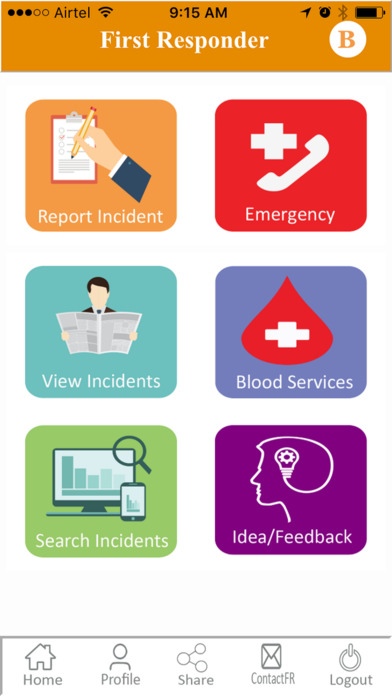
My First Responder mobile app is developed to support 'smart city - safety and security' theme, app helps users to report any type of incidents and feedback/suggestions/ideas to respective government departments, NGO organizations, police department, ambulance services and hospitals. Citizens can use this app to report any problems they see or they experience in day to day life to responders with geo tagging, photo and geo address.
Citizen services - helps in simplifying reporting incidents, app will fetch location address, geo tagging and helps to take a photo and submit incident in few seconds. When incident is reported, app will help to share the incident with respective officers through email and push notification. If the incident is of emergency type like accident, app will send a notification to emergency service responders to provide help.
- Accident reporting, Women Safety, municipality services, Roads and buildings, RTC buses, Railways, cybercrime, traffic, weather and natural calamity
Citizens can search for incidents reported nearby community/ house, or based on specific location search, support or like already reported incident if they see or experience the same problem.
Women safety & Personal emergency - when a person is travelling late night to airport or from office to home in private cabs or public transportation, and if that person wants family to proactively track for safety reasons, users can use track me feature. My First Responder app will send a notification and message to registered emergency primary and secondary contacts, and they can track the family member. When the user is in real emergency, user can alert family to get immediate help and support. App will send message, email and push notification with person contact details and geo address to emergency contacts to reach the user at the earliest possible.
Internet connectivity is required for optimal app functionality and location services must be turned on.
End User License Agreement:
DISCLAIMER - Continued use of GPS running in the background can dramatically decrease battery life.
When user uses track me feature, emergency contacts (family and friends) will be able to receive and identify the location of individual. Even when app is running in back ground mode, app will continue to retrieve user's location and share with family and friends
When user attempts to submit any incident, app will receive current location of the user using location services to simplify the incident reporting by automatically capturing address.
Personal Emergency options -
Track me - user can use track me feature to allow friends and family members to track the user location.
Send SMS - User can use this option in personal emergency to send message with location details to personal friends and family members only.
Call emergency - This feature will help initiate a phone call with primary or secondary friend/family contact defined and this feature not will send any location details to friends/family.
Call Police - This feature to initiate phone call to public police emergency contact 100 and app will not send any location details to police department
Call Ambulance- This feature is to initiate phone call to public ambulance contact 108 and app will not send any location details to public ambulance service provide.
Requires iOS 8.0 or later. Compatible with iPhone, iPad, and iPod touch.
About My First Responder
The company that develops My First Responder is Polaiah Bathula. The latest version released by its developer is 1.0.7.
To install My First Responder on your iOS device, just click the green Continue To App button above to start the installation process. The app is listed on our website since 2016-09-03 and was downloaded 0 times. We have already checked if the download link is safe, however for your own protection we recommend that you scan the downloaded app with your antivirus. Your antivirus may detect the My First Responder as malware if the download link is broken.
How to install My First Responder on your iOS device:
- Click on the Continue To App button on our website. This will redirect you to the App Store.
- Once the My First Responder is shown in the iTunes listing of your iOS device, you can start its download and installation. Tap on the GET button to the right of the app to start downloading it.
- If you are not logged-in the iOS appstore app, you'll be prompted for your your Apple ID and/or password.
- After My First Responder is downloaded, you'll see an INSTALL button to the right. Tap on it to start the actual installation of the iOS app.
- Once installation is finished you can tap on the OPEN button to start it. Its icon will also be added to your device home screen.
Program Details
System requirements
Download information
Pricing
Version History
version 1.0.7
posted on 2016-09-03
Disclaimer
Official App Store Link
We do not host My First Responder on our servers. We did not scan it for viruses, adware, spyware or other type of malware. This app is hosted by Apple and passed their terms and conditions to be listed there. We recommend caution when installing it.
The App Store link for My First Responder is provided to you by apps112.com without any warranties, representations or guarantees of any kind, so access it at your own risk.
If you have questions regarding this particular app contact the publisher directly. For questions about the functionalities of apps112.com contact us.
